

























































Introduction
As business networks continue to grow, connecting more devices to the same physical infrastructure can create significant challenges. Employees, servers, printers, IP phones, wireless access points, security systems, and other connected devices may all share the same network environment. Without proper organization, this can increase unnecessary traffic, complicate network management, and create additional security risks.
This is where VLANs on Managed Switches become especially valuable.
A Virtual Local Area Network (VLAN) allows network administrators to logically divide a physical network into separate virtual networks. Instead of treating every connected device as part of one large network, VLANs can separate users and devices into different logical segments according to departments, functions, security requirements, or business needs.
For example, an organization can create separate VLANs for employees, guests, servers, voice communication, and security devices while using the same physical switching infrastructure. This approach provides greater control over how devices communicate and how network traffic moves throughout the organization.
Managed switches make this possible by providing the configuration and control required to create, assign, monitor, and manage VLANs. Administrators can configure switch ports, assign VLAN IDs, establish trunk connections, and control traffic between different network segments.
Understanding VLANs on Managed Switches is therefore essential for businesses looking to build a more organized, secure, and scalable network infrastructure.
In this guide, we will explain how VLANs work on managed switches and explore 7 key benefits they can provide for modern business networks.
Table of Contents
- What Is a VLAN?
- How VLANs Work on Managed Switches
- How VLAN Traffic Is Organized
- Access Ports vs. Trunk Ports
- 7 Key Benefits of VLANs on Managed Switches
- VLANs for Different Business Departments
- VLANs for Voice and IP Phones
- VLANs for Guest Networks
- VLANs for Security and IoT Devices
- Common VLAN Configuration Considerations
- VLAN Best Practices for Business Networks
- How to Choose the Right Managed Switch
- Why Managed Switches Are Important for VLAN Deployment
- Why Choose SAS Points
- Frequently Asked Questions
- Conclusion
What Is a VLAN?
A VLAN, or Virtual Local Area Network, is a logical network segment created within a physical network infrastructure. Instead of requiring separate physical switches for every group of users or devices, VLAN technology allows administrators to divide one physical switching environment into multiple isolated logical networks.
For example, a company may have employees from several departments connected to the same managed switch. Rather than placing every device in one broadcast domain, the network administrator can create separate VLANs for:
- Sales
- Finance
- Human Resources
- IT
- Servers
- Voice devices
- Guest users
Each VLAN can have its own logical network configuration while sharing the same physical switching infrastructure.
The major advantage is that physical location no longer has to determine network membership. A user can be connected to a switch in one part of the building while belonging logically to the same VLAN as users in another location.
This makes VLANs particularly useful for organizations that need better network segmentation without installing completely separate physical networks.
Why VLANs Are Used in Business Networks
Businesses use VLANs for several reasons.
First, VLANs help organize network devices according to their function. Instead of managing one large network containing every device, administrators can divide the infrastructure into smaller logical segments.
Second, VLANs can improve security by separating sensitive systems and users. For example, guest devices can be placed on a dedicated VLAN rather than sharing the same network segment as internal business systems.
Third, VLANs can reduce unnecessary broadcast traffic. Since each VLAN represents a separate broadcast domain, broadcast traffic can be contained within the appropriate segment.
Finally, VLANs provide flexibility. As an organization grows, administrators can modify logical network segmentation without completely redesigning the physical cabling infrastructure.
How VLANs Work on Managed Switches
Understanding VLANs on Managed Switches starts with understanding how a managed switch handles Ethernet frames.
A managed switch can be configured to recognize different VLAN IDs and associate individual switch ports with specific VLANs.
When a device connects to a configured port, the switch determines which VLAN that device belongs to based on the port configuration or other VLAN-related settings.
For example, imagine a managed switch with several connected computers.
The administrator could configure:
- Ports 1–8 for the Sales VLAN
- Ports 9–16 for the Finance VLAN
- Ports 17–20 for the IT VLAN
- Ports 21–22 for servers
- Ports 23–24 for another network purpose
Although all devices are physically connected to the same switch, the VLAN configuration logically separates their network traffic.
VLAN IDs
Each VLAN is normally identified by a numerical VLAN ID.
For example:
- VLAN 10 — Sales
- VLAN 20 — Finance
- VLAN 30 — IT
- VLAN 40 — Servers
- VLAN 50 — Guest Network
The actual numbering scheme can vary depending on the organization’s network design.
The important point is that the VLAN ID allows the network infrastructure to distinguish traffic belonging to different logical networks.
Access Ports and VLANs
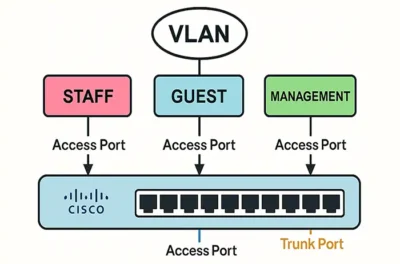
An access port is generally associated with a single VLAN.
This configuration is commonly used when connecting ordinary end devices such as:
- Desktop computers
- Laptops
- Printers
- IP cameras
- Some IoT devices
For example, if a switch port is configured as an access port for VLAN 10, a computer connected to that port can communicate within the network associated with VLAN 10.
The end device typically does not need to understand the VLAN configuration itself. The managed switch handles the necessary network segmentation.
This makes access ports an important component of VLANs on Managed Switches, especially in business environments where different departments need to remain logically separated.
Trunk Ports and VLANs
Trunk ports serve a different purpose.
While an access port generally carries traffic for one VLAN, a trunk connection can carry traffic belonging to multiple VLANs between compatible network devices.
Trunking becomes particularly important when an organization has multiple managed switches.
For example, suppose a company has switches located on different floors. The organization may want the Sales VLAN to extend across multiple switches while keeping Finance and IT in their respective VLANs.
Instead of creating a separate physical connection for every VLAN, a trunk link can carry traffic for multiple VLANs between the switches.
This provides a much more scalable approach to network design.
Tagged and Untagged VLAN Traffic
VLAN-aware networking commonly uses VLAN tags to identify traffic belonging to different VLANs.
The IEEE 802.1Q standard defines a VLAN tagging mechanism that adds VLAN-related information to Ethernet frames.
This allows network devices to identify which logical VLAN a frame belongs to as traffic moves through trunk connections.
In a typical business network:
End Device → Access Port → Managed Switch → Trunk Link → Another Managed Switch
The managed switching infrastructure can use VLAN information to keep traffic organized as it travels between different parts of the network.
7 Key Benefits of VLANs on Managed Switches
Now that we understand the basic concept, let’s look at the seven major benefits that make VLANs on Managed Switches valuable for modern business networks.
1. Improved Network Segmentation
One of the biggest advantages of VLANs is the ability to divide a large physical network into smaller logical segments.
Without VLANs, a business could have employees, visitors, servers, printers, phones, and security devices sharing the same broadcast domain.
That structure can become difficult to manage as the organization grows.
With VLANs, administrators can create logical boundaries between different groups.
For example:
| VLAN | Purpose |
|---|---|
| VLAN 10 | Sales |
| VLAN 20 | Finance |
| VLAN 30 | IT |
| VLAN 40 | Servers |
| VLAN 50 | Guest Access |
| VLAN 60 | Voice |
This segmentation makes the network easier to understand and manage.
Why Segmentation Matters
Logical segmentation allows administrators to apply different policies to different groups.
For example, guest users may only need Internet access, while employees may need access to internal applications and printers.
Similarly, server networks may require much stricter access controls than ordinary employee devices.
Using VLANs on Managed Switches allows these requirements to be addressed through network architecture rather than relying entirely on physical separation.
2. Better Network Security
Network security is another major reason organizations implement VLANs.
VLANs do not automatically make a network completely secure, but they provide an important foundation for implementing network segmentation and access-control policies.
Consider a business with a guest Wi-Fi network.
If guest devices are placed on the same logical network as internal employees, there is a greater risk of unwanted communication between guest devices and internal systems.
Instead, the organization can place guest traffic into a dedicated VLAN and use appropriate routing and security policies to control what that VLAN can access.
The same concept can be applied to:
- Finance systems
- Servers
- Management devices
- Security cameras
- Voice systems
- IoT devices
VLANs and Access Control
Once devices are logically separated, network administrators can control communication between VLANs using appropriate Layer 3 routing and security policies.
For example:
Guest VLAN → Internet: Allowed
Guest VLAN → Internal Servers: Restricted
This type of architecture provides much greater control than placing every device into one large network.
3. Reduced Broadcast Traffic
Another important benefit of VLANs on Managed Switches is broadcast-domain separation.
Network broadcasts are designed to reach devices within the same broadcast domain. As the number of devices increases, excessive broadcast traffic can consume network resources.
VLANs divide the network into separate broadcast domains.
For example, instead of having 300 devices in one large broadcast domain, an organization could divide them into several VLANs based on departments or device types.
This can help contain broadcast traffic and improve overall network organization.
Better Traffic Efficiency
Reducing unnecessary broadcast propagation allows network resources to be used more efficiently.
This becomes increasingly important as organizations add:
- More users
- More endpoints
- Wireless devices
- IP phones
- Cameras
- IoT systems
- Cloud-connected applications
A well-designed VLAN structure can therefore contribute to a cleaner and more manageable network architecture.
4. Easier Network Management
Managing a large network becomes considerably easier when devices are logically organized.
Instead of treating every endpoint individually, administrators can group devices according to their function.
For example, all Finance users could belong to one VLAN.
If the Finance department moves to another floor, the administrator does not necessarily need to redesign the entire network. The appropriate switch ports can simply be configured for the Finance VLAN.
This provides greater flexibility in business environments.
Simplified Administration
With managed switches, administrators can configure and monitor VLAN-related settings through the switch’s management interface.
Depending on the switch capabilities, administrators may be able to manage:
- VLAN assignments
- Port configurations
- Trunk links
- Traffic behavior
- Network monitoring
- Security settings
- Quality of Service policies
This centralized control makes VLANs on Managed Switches particularly useful for IT teams responsible for growing infrastructures.
5. Better Performance and Traffic Control
VLANs can also contribute to better network performance by organizing traffic according to business requirements.
Different types of traffic have different priorities.
For example, voice communication may require consistent latency and low packet loss, while ordinary file transfers may be less time-sensitive.
A business can use separate VLANs for different traffic categories and apply appropriate Quality of Service policies.
Example
A company could create:
Voice VLAN → IP Phones
Data VLAN → Employee Computers
Guest VLAN → Visitors
Server VLAN → Business Applications
This logical structure makes it easier to apply appropriate policies to each category.
Separating traffic does not automatically increase the physical bandwidth of a network, but it can create a more efficient and controllable architecture.
6. Greater Scalability
Business networks rarely remain the same size.
Organizations add employees, departments, devices, offices, applications, and services over time.
A VLAN-based network can make expansion easier because logical segmentation can be extended across the existing switching infrastructure.
For example, if a company creates a new department, administrators can create a dedicated VLAN and assign the appropriate switch ports to it.
If the department later expands to another floor, the VLAN can potentially be extended through trunk connections to additional managed switches.
This flexibility is one of the strongest advantages of VLANs on Managed Switches.
Supporting Future Growth
A scalable network design should anticipate future requirements rather than only addressing today’s needs.
When VLANs are planned correctly, businesses can establish a structured framework that supports:
- Additional users
- New departments
- More switches
- Additional access points
- IP telephony
- Surveillance systems
- IoT deployments
- New office locations
This reduces the need for major network redesigns as the organization expands.
7. More Flexible Network Architecture
The final major benefit is flexibility.
Traditional network segmentation may require physically separate networks and additional hardware. VLANs allow multiple logical networks to operate over shared physical switching infrastructure.
This gives network administrators much more freedom when designing and modifying business networks.
For example, an organization can create separate logical environments for:
- Employees
- Guests
- Servers
- Voice
- Security
- IoT
- Network management
All of these can potentially operate through the same physical switching infrastructure while remaining logically separated.
This flexibility makes VLANs particularly useful for modern workplaces where users and devices are constantly changing.
VLANs for Different Business Departments
One of the most common applications of VLANs on Managed Switches is departmental segmentation.
A typical organization might use VLANs like:
Sales VLAN
Used for computers and devices belonging to the sales team.
Finance VLAN
Used for financial employees and systems that require additional access restrictions.
HR VLAN
Used for HR-related systems and employee devices.
IT VLAN
Used by network administrators and technical teams.
Server VLAN
Used to logically separate servers and critical infrastructure.
This structure provides administrators with a clear network hierarchy and makes it easier to apply appropriate security and traffic policies.
VLANs for Voice and IP Phones
Voice traffic has unique performance requirements.
Latency, jitter, and packet loss can negatively affect call quality. For this reason, many organizations separate voice traffic from ordinary data traffic.
A dedicated Voice VLAN allows IP phones to operate within a logical network designed specifically for voice communication.
When combined with Quality of Service policies, this approach can help prioritize voice traffic during periods of network congestion.
Managed switches are especially useful here because they provide the configuration capabilities required to create and manage dedicated VLANs.
VLANs for Guest Networks
Guest access is another excellent use case.
Businesses often need to provide visitors with Internet connectivity without giving them access to internal resources.
A dedicated Guest VLAN can help achieve this separation.
For example:
Guest Devices → Guest VLAN → Controlled Network Access → Internet
Meanwhile:
Employee Devices → Internal VLAN → Business Resources
This architecture helps maintain a clearer boundary between external users and internal business systems.
VLANs for Security and IoT Devices
Modern businesses increasingly deploy connected devices such as cameras, sensors, access-control systems, and other IoT equipment.
Putting these devices on dedicated VLANs can simplify management and help limit unnecessary communication with other network segments.
For example, security cameras could operate on a dedicated VLAN while access to that VLAN is restricted to authorized systems.
This approach can help organizations maintain better visibility over connected devices and reduce the complexity of managing a large number of endpoints.
Common VLAN Configuration Considerations
Before deploying VLANs on Managed Switches, organizations should carefully plan their network structure.
Important considerations include:
VLAN Naming
Use clear and consistent names that make the purpose of each VLAN immediately understandable.
For example:
- SALES
- FINANCE
- SERVERS
- VOICE
- GUEST
- MANAGEMENT
VLAN Numbering
Establish a logical numbering scheme that can be maintained as the network grows.
IP Address Planning
Each VLAN generally requires an appropriate IP subnet when routing between VLANs is required.
Trunk Configuration
Trunk links should be configured consistently between network devices that need to carry multiple VLANs.
Inter-VLAN Routing
If devices in different VLANs need to communicate, routing between VLANs must be configured through an appropriate Layer 3 device or switch.
Security Policies
Do not assume that VLAN separation alone provides complete security. Appropriate access-control and firewall policies should be implemented where necessary.
VLAN Best Practices for Business Networks
A successful VLAN implementation requires thoughtful planning.
Keep the VLAN Structure Simple
Creating too many VLANs can make the network unnecessarily complicated. VLANs should have a clear purpose.
Document the Configuration
Maintain documentation showing VLAN IDs, names, subnets, switch ports, and routing policies.
Use Consistent Naming
Consistent naming makes troubleshooting significantly easier.
Separate Sensitive Systems
Critical systems should be logically separated from ordinary user devices whenever appropriate.
Review VLAN Membership Regularly
As employees and devices change, VLAN assignments should be reviewed to ensure they remain accurate.
Monitor Network Performance
Managed switches can provide useful visibility into traffic patterns and network behavior.
Plan for Future Expansion
Design the VLAN architecture with expected business growth in mind.
How to Choose the Right Managed Switch
The managed switch is the foundation for implementing VLANs on Managed Switches, so businesses should carefully evaluate switch capabilities before purchasing.
Important factors include:
Number of Ports
Determine how many devices need to connect now and how many additional ports may be required later.
Port Speed
Consider whether your network requires Fast Ethernet, Gigabit Ethernet, or higher-speed connectivity.
Uplink Capacity
High-speed uplinks are important when connecting switches to other switches, servers, or core network infrastructure.
VLAN Support
Make sure the switch supports the VLAN functionality required by your network architecture.
Layer 2 and Layer 3 Capabilities
Layer 2 managed switches can provide VLAN segmentation, while Layer 3 capabilities may be required when routing between VLANs is needed.
PoE Support
If your organization uses IP phones, wireless access points, or security cameras, PoE capability may simplify deployment.
Management Features
Look for management capabilities that provide sufficient visibility and control for your IT team.
Why Managed Switches Are Important for VLAN Deployment
While unmanaged switches are useful for simple plug-and-play connectivity, they do not provide the same level of configuration and control required for advanced VLAN-based network architectures.
Managed switches give administrators the ability to configure VLANs, assign ports, establish trunk connections, monitor traffic, and implement other network policies.
This makes managed switching infrastructure a key component of professional business networks.
For organizations that require segmentation, security, scalability, and centralized control, choosing the right managed switch can have a significant impact on network performance and long-term maintainability.
Why Choose SAS Points for Managed Networking Solutions?
Building a structured business network requires more than selecting hardware based on port count or price. The switching infrastructure needs to match the organization’s current requirements while providing enough flexibility for future growth.
At SAS Points, we provide networking solutions designed to support different business environments and infrastructure requirements.
Our approach focuses on helping organizations identify suitable networking hardware based on factors such as:
- Number of connected devices
- Required port speeds
- VLAN requirements
- PoE requirements
- Network scalability
- Data center requirements
- Performance expectations
Whether your organization is upgrading an existing network or building a new infrastructure, selecting the right managed switching solution can help establish a stronger foundation for future growth.
Frequently Asked Questions About VLANs on Managed Switches
What are VLANs on Managed Switches?
VLANs on Managed Switches allow administrators to divide a physical switching infrastructure into multiple logical networks. This helps organize devices, control traffic, and improve network segmentation.
Why should businesses use VLANs?
Businesses can use VLANs to separate departments, guest users, servers, voice systems, security devices, and other network resources while sharing the same physical switching infrastructure.
Do VLANs improve network security?
VLANs can improve network segmentation and provide a foundation for stronger security policies. However, VLANs alone should not be considered a complete security solution.
Can multiple VLANs use the same managed switch?
Yes. A managed switch can support multiple VLANs, depending on its capabilities and configuration.
What is the difference between an access port and a trunk port?
An access port is generally associated with one VLAN for end devices, while a trunk port can carry traffic for multiple VLANs between compatible network devices.
Do I need a Layer 3 switch for VLANs?
Not necessarily. Layer 2 switches can create and manage VLANs. However, if devices in different VLANs need to communicate through the switch, Layer 3 routing capabilities may be required.
Can VLANs improve network performance?
VLANs can help organize traffic and reduce unnecessary broadcast propagation. They can also make it easier to apply traffic-management policies, although VLANs do not increase the physical bandwidth of the network.
Conclusion
VLANs on Managed Switches provide businesses with a powerful way to organize and manage modern network infrastructures. By dividing one physical network into multiple logical segments, organizations can improve network organization, strengthen segmentation, control traffic, and create a more scalable infrastructure.
The seven key benefits discussed in this guide—better segmentation, improved security, reduced broadcast traffic, easier management, better traffic control, scalability, and architectural flexibility—make VLAN technology an important part of professional business networking.
As organizations continue to add employees, applications, wireless devices, IP phones, cameras, servers, and IoT systems, having a structured network architecture becomes increasingly important.
The right managed switch can provide the configuration and management capabilities required to implement an effective VLAN strategy. However, successful deployment depends on proper planning, IP addressing, port configuration, trunking, routing, and security policies.
If you’re planning to upgrade your network or implement VLAN segmentation, SAS Points can help you identify networking solutions that match your infrastructure requirements and future growth plans.
Build a more organized, scalable, and manageable business network with the right managed switching infrastructure from SAS Points.
While proper VLAN configuration can improve network organization and performance, businesses may still encounter connectivity and switching issues. Learn how to identify and resolve the most common issues in our guide to 10 Common Network Switch Problems and How to Fix Them.
Shop now


Sold out






Sold out







Sold out


Sold out

Sold out


Related posts

VPN Firewall vs Standard Firewall: 7 Key Differences

Businesses need reliable network security to protect sensitive information, prevent unauthorized access, and maintain secure commu...

Rack Server vs Tower Server: 6 Key Differences Explained

Rack Server vs Tower Server: 6 Key Differences Explained
Choosing between a rack server and a tower server is an important decisi...

SSD vs HDD Storage: 8 Key Differences Every Business Should Know
SSD vs HDD Storage: 8 Key Differences Every Business Should Know
Choosing the right storage technology is essential for businesse...

Router Performance Explained: 7 Factors That Affect Your Internet Speed

Router performance plays a critical role in determining how efficiently a business network handles daily operations. From cloud-ba...

10 Router Security Features That Help Protect Business Networks
Business networks are constantly exposed to security risks, from unauthorized access and malicious traffic to compromised devices ...

Stateful Firewall vs Next-Generation Firewall: 8 Major Differences
Firewalls play a critical role in protecting business networks from unauthorized access, suspicious traffic, and cyber threats. Ho...

7 Firewall NGFW Types Compared for Business Network Security
Choosing the right NGFW firewall is an important part of protecting business networks fro...

11 Server Features Every IT Manager Should Look For
11 Server Features Every IT Manager Should Look For
Choosing the right server is an important decision for any organization. Serv...

Best RAM Options for Performance Workstations
Best RAM Options for Performance Workstations
Modern performance workstations are built for demanding workloads such as 3D render...

Dual-WAN vs Single-WAN Routers: 6 Key Differences Compared
Modern businesses rely heavily on stable Internet connectivity for cloud applications, communication, online platforms, remote acc...

Wi-Fi Router vs Wired Router: 8 Differences Every Business Should Know
Choosing the right networking equipment is an important decision for any business. As organizations become increasingly dependent ...

Storage Buying Guide: 7 Things to Consider Before You Choose
Storage Buying Guide: 7 Things to Consider Before You Choose
Modern businesses generate and manage large amounts of data every da...
